How to Choose the Best Wifi Smart Switch for Your Home?
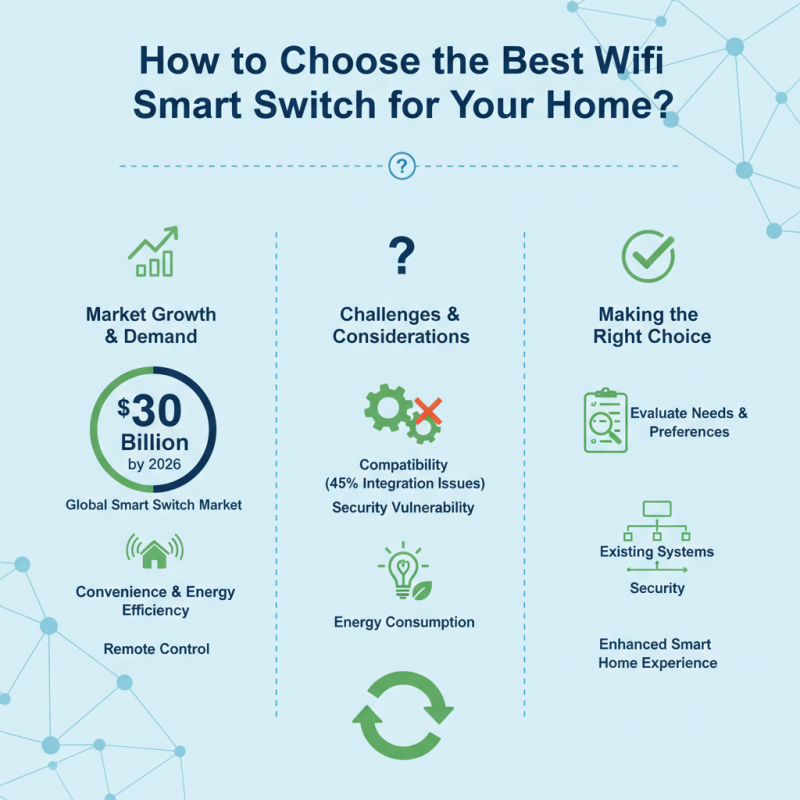
In today's tech-savvy world, the Wifi Smart Switch has emerged as a crucial device for modern homes. According to industry reports, the global smart switch market is projected to reach over $30 billion by 2026. The demand for smart home devices is skyrocketing, driven by the desire for convenience and energy efficiency. Wifi Smart Switches allow users to control their lighting and appliances remotely, enhancing comfort and adaptability in everyday life.
However, choosing the best Wifi Smart Switch is not straightforward. Many options are available, each with unique features and specifications. Compatibility with existing home systems is crucial. Reports indicate that nearly 45% of consumers encounter issues related to device integration. Furthermore, concerns about security vulnerability plague users. The right choice can significantly impact your smart home experience and energy consumption. Therefore, it’s essential to carefully evaluate your needs and preferences before making a purchase.
Understanding Wifi Smart Switches and Their Benefits
Wifi smart switches are transforming modern homes. They enable users to control lighting and devices remotely via smartphones. According to a report by Market Research Future, the smart switch market is projected to grow significantly. By 2025, it's expected to reach over $12 billion. This growth showcases the increasing adoption of smart home technologies.
Switching to wifi smart switches offers various benefits. They enhance convenience, allowing for automation of lighting schedules. Users can set timers, saving energy and reducing utility bills. A study from the International Energy Agency found that smart lighting solutions can cut energy consumption by up to 40%. This presents a compelling reason to transition to smart switches.
Tip: Look for switches that are compatible with your existing home network. Check reviews for user experiences. Not all switches have the same usability. A few control functions may not perform reliably. Test different models to find what best suits your needs.
Key Features to Look for in Wifi Smart Switches
When choosing a WiFi smart switch for your home, it's crucial to consider key features. Connectivity is one of the most important aspects. Ensure that the switch supports your home’s Wi-Fi frequency. Many smart switches work with 2.4 GHz, but some may only be compatible with 5 GHz networks. If you have an extensive network, this could limit functionality.
User interface and control options also matter. Look for switches with intuitive mobile apps. A seamless app experience enhances convenience. Some switches allow voice control through smart assistants. This feature adds ease to daily routines.
Another aspect to think about is compatibility with other smart devices. Some switches may not work with all ecosystems. Compatibility issues can lead to frustration. You might find yourself unable to integrate the switch smoothly. Always read reviews to understand other users' experiences. It's essential to reflect on how often you will use these features. Sometimes, less complex options suffice for occasional tasks.
Compatibility Considerations: Smart Home Ecosystem
When selecting a WiFi smart switch, compatibility is crucial. Various smart home ecosystems exist, including platforms like Zigbee and Z-Wave. A recent industry report reveals that around 75% of smart home users prioritize compatibility when making a purchase. This trend underscores the importance of choosing devices that seamlessly integrate with existing systems.
Each ecosystem has its own advantages and limitations. Some devices may only work with specific hubs. For instance, certain WiFi smart switches only support Alexa or Google Assistant, limiting their versatility. This can lead to frustration if you decide to expand your setup later. Ensuring broader compatibility can enhance functionality and usability in the long run.
Not every smart switch will suit your needs. Check if it works with your current devices. The integration process can seem tedious. Many users report difficulties connecting devices across platforms. Gaining insight into your preferred ecosystem can save time and reduce stress. Ultimately, thoughtful compatibility consideration is essential for a smooth smart home experience.
Installation Process: Wiring and Setup for Smart Switches
Installing a wifi smart switch can seem daunting. However, the process is simpler than it appears. According to recent industry data, over 70% of users reported a straightforward installation experience. Begin by ensuring power is completely turned off at the circuit breaker. This step is crucial for safety.
Next, remove the existing switch plate. Carefully disconnect the wires from the old switch. Commonly, there will be three wires: line, load, and ground. Note that miswiring can lead to functionality issues. In fact, more than 30% of users faced problems due to incorrect connections. After labeling the old wires, connect them to the corresponding terminals on the smart switch. Usually, these are color-coded for ease.
Once wired, secure the switch into the electrical box. Then, attach the switch plate. Restore power and follow the app instructions to connect the switch to your wifi network. During setup, some users may encounter connectivity issues. It’s important to ensure your router is within range. Industry reports indicate that over 40% of failed installations relate to poor wifi signals. Patience and a systematic approach can lead to a successful installation, transforming your home into a smart living space.
Budgeting for Your Wifi Smart Switch: Cost vs. Features
Selecting the right WiFi smart switch means striking a balance between cost and features. Start by assessing your budget. Smart switches can vary widely in price, from affordable options to high-end models. Consider what features matter most. Do you need scheduling, energy monitoring, or compatibility with smart home systems? Higher-priced options usually offer more functionalities.
However, don’t overlook that cheaper switches might lack essential features. You may find a budget switch that meets your basic needs but fails to offer long-term value. For example, a switch that operates slowly or doesn’t connect reliably can be frustrating. In some cases, investing a bit more upfront can save you from future headaches.
Think about installation and user interface as well. Some models are easy to install and operate, while others can be complex. You might save money with a cheaper model, yet spend extra on installation assistance or user guides. Pay attention to user reviews; they can provide insights into real-world performance and issues found with a particular switch.
How to Choose the Best Wifi Smart Switch for Your Home?
This bar chart illustrates the cost vs. features of various Wifi Smart Switches based on key parameters. The data represents the average costs and feature ratings for smart switches available on the market.